


Have you ever felt like a website was watching you, knowing exactly where you are located before you even log in? Every time you visit a page, you leave behind a unique identifier called an IP address, which acts much like your physical home address. This trail constitutes your digital footprint, allowing companies to track your movements and build a profile of your online habits. Choose the best proxies for scraping.
Websites utilize this location data for everything from serving targeted ads to blocking you from viewing content available in other countries. Privacy advocates often point out that browsing without protection is like sending a postcard through the mail; anyone handling it can see exactly who sent it and what is written on the back. To stop this tracking, you need a way to separate your identity from your online requests.
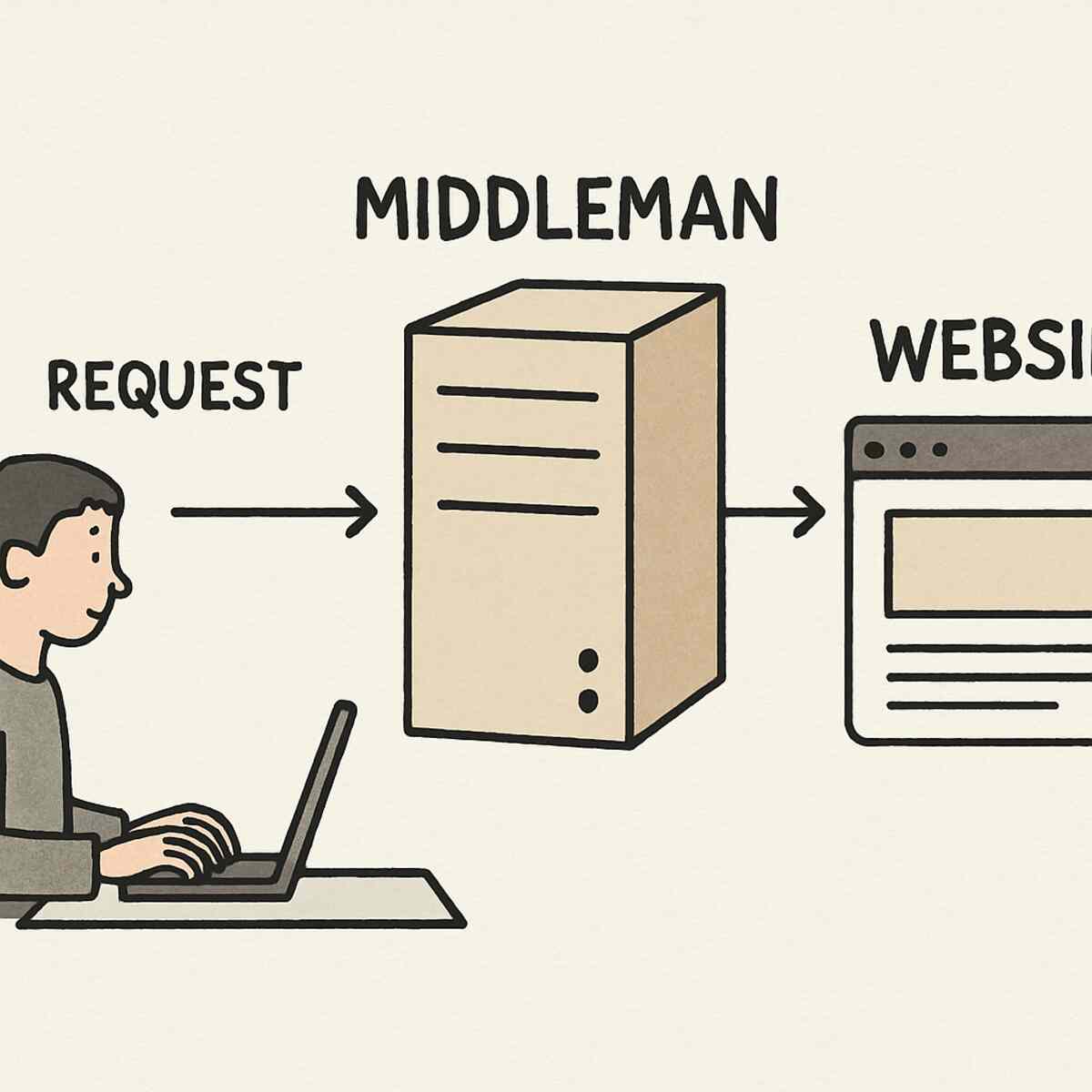
![A user sitting at a laptop sending a request arrow to a server labeled ‘Middleman,’ which then sends a separate request to a website, illustrating the indirect connection.]
Enter the proxy server, a tool that functions as a helpful intermediary between you and the internet. Instead of connecting directly to a site, you send your request to the proxy, which then asks the website for information on your behalf. This method of protecting online privacy with masking IPs acts as a digital disguise, ensuring the website sees the server’s details rather than your personal information.
While there are many types of intermediaries, a dc proxy (Datacenter Proxy) is the high-speed commercial version of this disguise. Housed in powerful “digital warehouses” rather than residential homes, these servers offer the performance needed for seamless browsing. Setting up this specific type of shield secures your identity without slowing you down.
Why Your Digital Footprint Matters
Imagine walking into a travel agency and being quoted a higher price for a flight just because the agent saw you park a luxury car outside. This happens digitally through dynamic pricing. Airlines and hotel booking sites often use your location—revealed by your IP address—to adjust costs based on perceived purchasing power. If you check a flight price repeatedly from the same connection, the site assumes urgency and might hike the fare.
Your internet connection functions like a digital ID card shown at every website’s front door. While browser cookies track history, your IP address anchors that data to a specific location, allowing companies to build a permanent profile. Even if you use “Incognito Mode” to clear local history, your digital identity remains visible to the website because your unique address hasn’t actually changed.
Breaking this cycle requires swapping out that personal ID card for a generic one. A dc proxy server acts as a shield, hiding your personal home address behind a fast, commercial facility’s address. While big companies use this technology for anonymous web scraping at scale to gather market data without blocks, everyday users employ the same tool to compare prices fairly or protect privacy without sacrificing speed.
What is a Datacenter Proxy?
Most internet connections are tied to a physical street address provided by ISPs like Verizon or AT&T. In contrast, a DC proxy originates from the “industrial districts” of the internet. Instead of coming from a living room, these digital identities are housed in massive, purpose-built facilities known as datacenters.
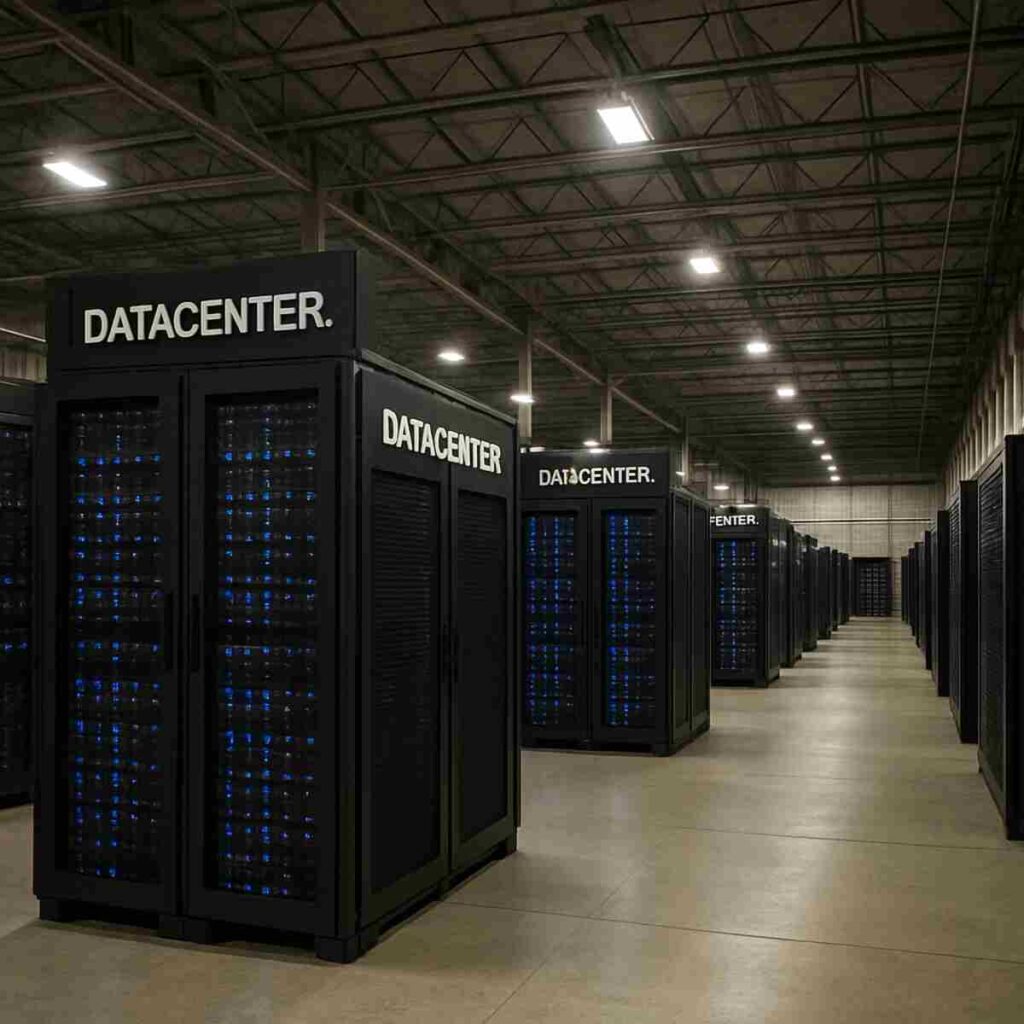
![A large server farm/warehouse with rows of computer racks labeled ‘Datacenter’]
Visualize a sprawling warehouse filled with rows of humming computer servers stacked floor-to-ceiling. These “server farms,” owned by major tech corporations, are designed for uninterrupted operation. Unlike a home router that struggles with multiple video streams, these facilities operate on cloud service provider IP ranges—blocks of digital addresses reserved specifically for high-volume commercial use.
Using one of these proxies is comparable to renting a commercial P.O. Box. When you browse through a datacenter, the website sees the request coming from that secure warehouse rather than your personal device. It provides anonymity by stripping away the personal location details associated with a standard residential internet service provider.
This industrial-grade infrastructure offers a distinct advantage: raw power. Wired directly into the internet’s main arteries with fiber-optic cables, they handle massive data loads that typical household connections cannot match.
The Speed Secret: Why DC Proxies Outperform Home Connections
Speed is the primary reason users switch to commercial infrastructure. The main advantage is low latency—the travel time for a signal to go from your computer to a website and back. While a standard home connection navigates neighborhood wiring and local utility nodes, datacenters are physically plugged into the internet’s fiber-optic “backbone.”
This direct access removes traffic jams that slow down residential networks. Because the signal encounters fewer stops, requests process almost instantly. For users running software that checks thousands of prices or products, DC IPs act as the fastest proxies for automated tasks, accomplishing hours of manual work in minutes without consumer-grade lag.
The performance difference is measured in milliseconds (ms), a critical factor for securing limited-edition items or gathering real-time data:
- Standard Home Connection: ~30–100ms latency (Subject to congestion)
- Datacenter Connection: ~1–10ms latency (Consistent, high-speed stability)
However, this incredible speed comes with a distinctive “commercial” digital fingerprint that some security systems might recognize as non-human behaviour.
Residential vs. Datacenter IPs: Choosing the Right ID
While datacenter proxies offer speed, they carry a “commercial” label distinct from typical users. Think of this like the difference between a corporate building pass and a standard government ID. A corporate pass (the proxy DC) is efficient for business access, but a government ID proves you are a resident. Websites generally trust “residents”—real people browsing from home connections—more than commercial servers often associated with automation.
Real residential IPs are assigned by Internet service providers directly to homeowners. When you use a residential proxy, you borrow a digital identity tied to a physical location and a utility bill. Because these addresses look like regular families, they hold a high “trust score,” making it difficult for security systems to block them without accidentally banning legitimate customers.
Choosing between residential vs datacenter IPs balances speed against camouflage. If you are checking flight prices on a site with standard security, the high-performance datacenter option is superior. However, for tasks like buying limited-edition items from stores with aggressive security, the stealth of a residential connection is necessary. You trade the lightning-fast response of the datacenter for the disguise of a home user.
Datacenter proxies, housed in efficient digital warehouses, are far more abundant and affordable. For many users, this “commercial” option provides enough power to get the job done without the premium price tag attached to high-trust residential anonymity.
The Cost-Effectiveness of Going ‘Commercial’
Creating a thousand IP addresses in a server farm is much easier than convincing a thousand homeowners to share their connections. This efficiency translates to cost savings. Because providers generate resources in massive batches without navigating complex ISP contracts, the base cost of a dc proxy is often pennies compared to the dollars required for residential options.
Savings multiply when considering exclusivity. Providers typically offer a choice between shared vs dedicated proxy addresses. A dedicated IP is like renting a private hotel room—reserved solely for your use to ensure peak performance. Shared options split resource usage among several users simultaneously. While this might slightly impact speed, it divides the cost, making it the choice for budget-conscious projects.
Scaling up for larger tasks reveals staggering financial differences:
- 1,000 Residential IPs: Can cost $2,000–$5,000+ monthly.
- 1,000 Datacenter IPs: Often available for under $1,000, with shared options dropping the price further.
Once secured, you need to understand how these addresses deliver your messages.
How HTTP Proxies Act as Your Browser’s Postcard
Every time you click a link, your computer sends a digital request that functions like a physical postcard. This contains the address you want to visit, the message asking for a webpage, and your return address. This standard system is known as the HTTP protocol, powering everything from news blogs to online stores.
A DC proxy server acts as the mail clerk, intercepting your postcard. It crosses out your personal home return address and stamps its own commercial warehouse address. When the website receives the request, it sees only the warehouse’s location and sends the response there. The proxy then forwards that response to you, ensuring the website never learns the originator.
This setup works perfectly for checking prices or viewing geo-blocked content because web browsers are fluent in this “postcard” language. HTTP proxies efficiently handle text and images, making them the lightweight choice for general surfing.
However, postcards are open; they cannot easily carry complex items like live video streams or gaming data. When digital needs grow beyond simple text, you require a method that functions like a sealed, secure parcel.
SOCKS5: The ‘Secure Parcel’ for All Traffic
The internet involves more than just reading news. Applications like video calling or download managers speak languages that standard HTTP setups struggle to translate. SOCKS5 proxies solve this by acting like a dedicated courier service moving sealed parcels.
When using this protocol, the DC proxy server doesn’t interpret the data. It picks up the package from your computer and delivers it to the destination exactly as is, whether that package contains a webpage, a video stream, or a secure file transfer.
This “don’t ask, just deliver” approach makes the distinction between SOCKS5 vs HTTP protocols vital. Because SOCKS5 handles any traffic without interference, it serves as a universal tool. It allows you to protect traffic from specific applications outside your web browser, ensuring your gaming connection or streaming app enjoys the same anonymity as your Chrome searches.
By treating data as a sealed box, SOCKS5 ensures nothing gets lost in translation, resulting in a faster connection for heavy-duty tasks. Yet, even efficient couriers get bogged down if too many people use the same truck.
Dedicated vs. Shared: Why Having Your Own Lane Matters
Choosing infrastructure involves weighing cost against reliability. Think of the shared vs dedicated proxy addresses choice like renting a room in a crowded house versus buying a private home. Shared options are affordable because multiple users split the cost, but you share the address’s reputation. If a “roommate” engages in suspicious activity, the website’s security guard blocks the entire house, locking you out despite your good behavior. This “bad neighbor effect” means your access depends on strangers.
Upgrading to a dedicated IP grants you a specific digital identity solely for your use:
- Shared Proxies: Cost-effective but prone to slowdowns and blocks caused by others.
- Dedicated Proxies: Higher investment but guarantees that common reasons for IP blacklisting—like spam—never impact your work.
A private connection ensures you are judged solely on your own actions. However, even a private lane needs to originate from a trustworthy location.
Why Washington DC Proxies are the ‘Gold Standard’
Speed is bound by physics. Data traveling across the Atlantic creates delay. Choosing a proxy dc server located near your target website acts like a shortcut, positioning your digital “package” next door to its destination.
This region is the “bullseye” of the internet because a massive portion of global web traffic flows through Northern Virginia and the capital area. Using a washington dc proxy taps into this dense infrastructure. Instead of routing through a backroad server, you merge onto the internet’s widest superhighway. For users needing to gather data without lag, this central hub ensures maximum responsiveness.
Location also dictates visibility. Websites often show different content or prices based on location. Researchers use a DC proxy to view government portals or market data exactly as someone in the capital would, ensuring accuracy. Once you understand the importance of location, the final piece is selecting the right service.
Step 1: Choosing a Provider and Picking Your ‘Mask’
Finding the right service is like choosing a mobile phone carrier. You don’t need to build a data center; you simply shop for a reputable provider who owns the hardware. When setting up a private proxy server, you gain access to a user dashboard—your “remote control” for the service. Here, you purchase plans, track usage, and configure settings without typing complicated commands.
Ensure your provider offers:
- Live Support: Real assistance for setup issues.
- Hardware Speed: High-performance options for fast loading.
- Location Control: The ability to pick specific cities.
Inside the interface, select your digital location. For the reliability of the capital region, navigate to the location menu and select a Washington DC server to assign a unique digital ID from that warehouse.
Step 2: Authentication—Who Are You to the Proxy?
Providers lock down their tools to prevent unauthorized usage. Without verification, the server cannot distinguish between a paying customer and a stranger.
The most common method is standard authentication: a specific username and password tied to the proxy. Whenever your computer connects, a window asks for these credentials. This is portable, making it ideal if you switch between locations.
For a smoother experience, use IP whitelisting. This tells the dc proxy server to automatically trust traffic from your home internet address. It acts like a VIP list; if your address is listed, the doors open without checking ID. While faster, you must update the approved address whenever your physical location changes.
Step 3: Configuring Your Browser
By default, browsers take the direct path to websites, broadcasting your real location. You must explicitly route traffic through the dc proxy. This manual process requires the IP Address (the street address) and the Port Number (the specific unit).
![Image: A screenshot of the ‘Proxy Settings’ window in a web browser with the Address and Port fields highlighted.]
Configuration typically follows this pattern across Chrome, Firefox, or Edge:
- Open the browser’s “Settings” menu.
- Search for “Proxy” or “Network Settings.”
- Select “Manual proxy configuration.”
- Copy the provider’s IP address into the “HTTP Proxy” box and the Port number into the “Port” box.
- Click “Save” or “OK.”
Visit a site like “What Is My IP” to confirm your location has changed. To avoid detection during repetitive tasks, you may need to switch your disguise automatically.
Rotating Your IPs: The Digital ‘Musical Chairs’
Websites recognize repetitive patterns. If a single static IP makes too many requests, security systems slam the door. To stay under the radar during high-volume tasks, you need an entire wardrobe of disguises.
Rotating IP address pool management allows access to a reservoir of thousands of unique proxies. The system dips into this pool and assigns a fresh identity for each request or session. Most advanced services handle this automatically. You can configure the tool to change your IP with every page load or keep the same one for a few minutes (“sticky sessions”).
![Image: A circle of icons representing different IP addresses with arrows showing them rotating in a loop.]
This strategy is the golden rule for how to scrape websites without getting blocked. The target website perceives your activity as hundreds of different human users rather than one bot. By never settling in one spot, you prevent algorithms from flagging your behavior.
Integrating Proxies into Your Apps
The real power of proxies emerges when plugged into automation software. Whether using a travel fare aggregator or a sneaker bot, these applications include a “Network” or “Proxy” settings menu. This is the control center where you input your credentials.
For advanced users, integrating proxy APIs into scraping scripts allows software to request a new dc proxy automatically upon hitting a roadblock. For off-the-shelf tools, simply entering your details enables the software to handle the complex handshake in the background.
Because standard protocols are widely accepted, a single subscription can power multiple tools—monitoring competitor pricing on one platform while securing tickets on another.
Bypassing ‘Digital Borders’ for Market Research
The internet operates like a series of gated communities. Websites frequently treat visitors differently based on origin, leading to “content unavailable” messages or price discrimination. Datacenter proxies allow you to switch your digital location instantly, unlocking these doors.
If you are analyzing competitor pricing in Europe, you cannot get accurate data from an American connection. By routing through a remote server, you are bypassing geo-restrictions for market research and viewing the web as a local user. This ensures prices and search results are authentic to that region.
Sometimes, a country-level view isn’t enough. A specific Washington DC proxy allows you to see how local services appear to capital residents. This level of control turns the internet into an open book.
Why Websites Use ‘Bouncers’ to Block Proxies
Websites actively protect data with “digital bouncers.” These security systems scan for suspicious actors. If your proxy looks fake or behaves strangely, the bouncer adds your address to a “blacklist.”
Most users get blocked by acting too aggressively. Avoid these common reasons for IP blacklisting:
- Speeding Tickets: Making physically impossible numbers of requests in seconds.
- Robotic Movements: Predictable, perfectly timed intervals.
- Bad Reputation: Using a “shared” IP previously ruined by spam.
How to scrape websites without getting blocked relies on mimicking natural human behavior. If you knock politely, the door opens; if you pound on it, the deadbolt slides shut.
Best Practices for a ‘Low Profile’ Online
To slip past the digital bouncer, adopt the rhythm of a person. Humans read headlines and scroll; they don’t grab everything instantly. Deliberately slow down your activity, adding random pauses between clicks.
Implementing polite delays is essential for web crawler optimization. Spacing visits out over minutes signals to security systems that you are browsing naturally. While a dc proxy server is built for speed, restraining that power helps maintain a high “trust score.”
Even with perfect timing, staying on the same digital street corner too long draws attention. You need to ensure your footprint comes from a wide variety of “neighborhoods.”
Staying Under the Radar with IP Range Diversity
Digital addresses come in clusters (subnets). If security detects suspicious activity from one address, they often block the entire cluster. If your dc proxy package relies on a single subnet, one ban kills all your connections.
Avoid this by spreading your footprint. High-quality providers offer diverse cloud service provider IP ranges, allowing you to pick proxies from different server farms. This protects access in three ways:
- Safety: A ban on one address won’t trigger a blanket block.
- Reliability: If one datacenter has an outage, others remain functional.
- Stealth: Scattered addresses look like random crowd traffic.
Your 5-Step Checklist for DC Proxy Success
Putting theory into action yields results. Follow this roadmap to get your connection running smoothly:
- Choose a Provider: Look for diverse subnets to avoid cluster-blocking.
- Pick Your Location: Select a server in the specific city or country needed.
- Authenticate: Whitelist your home IP address in the dashboard.
- Configure: Input the IP and port into your browser or software.
- Test: Visit a “What Is My IP” website to confirm your digital location has changed.
With these steps, you have effectively bypassed geographic borders. While setting up a private proxy server sounds technical, it becomes second nature quickly.
The Future of Your Privacy and Access
You now possess the knowledge to browse on your own terms. Understanding the utility of a dc proxy transforms the internet from a restricted space into an open highway. You are no longer tethered to a single digital location; you have the tools to swap your “home address” for a commercial-grade disguise whenever the situation demands it.
Start with a simple experiment: use a basic proxy service to view a news site or shopping platform as if you were in a different country. Note how prices or content shift. This confirms that protecting online privacy with masking IPs is a practical way to regain control over your experience. By mastering this digital intermediary, you ensure your access to information remains unrestricted.
